

Why Updating Tech Packs: Managing Revisions During Sampling Matters
Every apparel collection starts with a vision—but turning that inspiration into production-ready garments is all about the details. As soon as samples hit the sewing room, tweaks and changes come thick and fast. That’s where updating tech packs: managing revisions during sampling becomes crucial. A dynamic version control process ensures feedback is captured, revisions make it into your specs, and nothing gets lost between development and the final order. Skip this, and you risk delays, miscommunication, or costly mistakes.
What Is a Tech Pack and Why Does It Change?

A tech pack is a blueprint for your garment that covers materials, measurements, construction, and trims. But when real samples are made, details almost always need adjusting. Maybe the sleeve is too tight or the pocket is too shallow. Instantly, your original tech pack needs an update. Learning to manage these changes is as important as writing the tech pack itself—it’s what ensures your final product matches your vision.
Common Revision Triggers During Sampling
Why does a tech pack need so many revisions during sampling? Here are classic triggers:
- Sample doesn’t match the original fit, requiring pattern tweaks
- Suppliers propose alternative trims or fabrics due to material shortages
- Construction details (like seam type) affect comfort or cost
- Unexpected QC or durability issues appear after wash tests
- Branding or label placement looks awkward in 3D
Principles of Effective Version Control
Version control means maintaining a clear, date-stamped record of every revision. This isn’t just for tech geeks—it’s the only way to avoid confusion between your team, your designer, and the factory floor. Every sample should have a matching tech pack version, so everyone works off the same page.
Setting Up a Revision Log in Your Tech Pack
Begin every tech pack with a revision history section. This can be a simple table showing:
| Version | Date | Summary of Change | Reason |
|---|---|---|---|
| V1.0 | 2024-04-01 | Initial creation | Design concept approved |
| V1.1 | 2024-04-12 | Adjusted sleeve width | First sample fit too tight |
| V1.2 | 2024-04-18 | Changed pocket placement | Customer feedback |
How to Collect and Integrate Sample Comments
Every fitting, test, or review session should be captured as actionable sample comments. Prioritize clarity; for example:
- “Move shoulder seam 1cm forward for better drape.”
- “Increase waistband elasticity—test 5mm more stretch.”
- “Swap label to printed care instructions for comfort.”
Structured sample comments become your checklist for the next tech pack update. For practical advice on the specifics of tech pack sections to update, see the Tech Pack Template Essentials.
Timing Revisions: When to Update, When to Wait
Update your tech pack after each fitting round—not on every fleeting idea. Collect all comments, review them, decide on action, then issue a new version. Avoid ‘drip-feeding’ small changes, which can baffle your sample maker. Clear, round-based versions are easier to manage and reference.
Best Practices for Documenting Changes
Some small changes don’t warrant a new version, but big ones always do. Always:
- Summarize key changes in the revision log
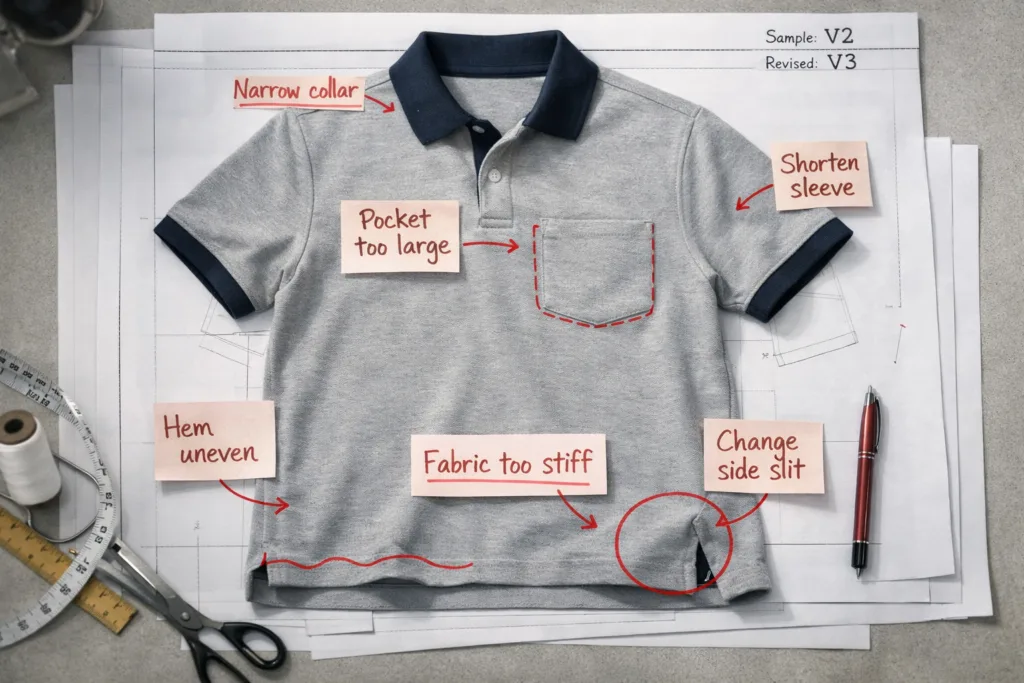
- Highlight visual updates (use redlines, bold, or comments in your tech pack PDF)
- Communicate with the sampling team which version is current
Sample Comments: The Heart of Update Cycles
Sample comments drive tech pack evolution. But be precise and action-oriented—vague requests like “Make more stylish” don’t help the pattern room. Focus on quantifiable adjustments and clear visual cues.
Choosing Version Control Tools (Simple and Advanced)
Options range from basic (Excel or Google Docs) to more advanced platforms like Techpacker or PLM tools. While big brands may choose full-featured systems, many SMEs and startups do well with simple tools. For a smart breakdown, check Excel vs Techpacker vs CLO3D.
Naming and Saving Tech Pack Versions
Stay consistent: e.g., “StyleCode_TechPack_v1.2.pdf”. Never overwrite the old files—always save each new version. When sending to sample makers, specify the version, so they know exactly which file to follow.
How Manufacturers Actually Use Revisions
Manufacturers, like Ninghow Apparel, rely on crystal-clear version control to prevent rework and wasted materials. When a change is unclear or missing from the file, production slows or stops for clarification. It’s industry standard in quality-focused OEM factories to keep sample, comment, and matching tech pack versions together—skipping this causes chaos later on.
The Role of Visual Aids in Version Control
Annotated images, direct side-by-side comparisons, and fit photos with measurement overlays give both pattern teams and sewing operators instant clarity. Text-only instructions are often misunderstood—visuals help bridge language and experience gaps. To eliminate common pitfalls in this area, explore the advice in Mistakes in Tech Packs That Cause Production Delays.
Sample Approval Meetings: Recording Decisions
Whenever sample comments are formally signed off—such as in pre-production fit meetings or video calls—write a summary and add it to your tech pack’s revision history. Include who approved changes, so the audit trail is rock-solid.
Dealing with Conflicting Feedback
When designers, buyers, or factories suggest opposing revisions, log both and decide after the next sample. If in doubt, document why the team chose one path over another; this avoids cycling back to the same debates later.
Supplier Comments: Closing the Loop
Don’t forget factory-side feedback. If your manufacturer—like Ninghow Apparel—flags construction risk or cost impact, add their input to your comments and revision history. This cooperation delivers a more production-friendly outcome.
Keeping Teams on the Same Page
Whether you’re working in-house or remotely, centralized version control (cloud storage or PLM) ensures no one is working from the wrong file. Encourage your teams to check date and version every time they reference the tech pack.
Ensuring Traceability Between Sample and Tech Pack
Label every physical or digital sample with its corresponding tech pack version number (hangtag, sticker, or sample sheet reference). Later, if a defect appears in production, you can check which sample and spec triggered the issue and fix it fast.
Archiving Old Versions: Why History Matters
Save every old tech pack and comment file (with versions and dates). Sometimes you’ll need to reference why a decision was made—or prove it for internal audits and quality claims.
How Tech Pack Updates Impact Cost and Lead Time
Every revision can affect quotation, minimums, or delivery. Details settled late in the process may trigger extra charges (new pattern, grading, trim reordering) or setbacks in lead time. The earlier and clearer you finalize, the smoother the road to mass production.
Case Study: Version Control in Action
Let’s say the first sample’s collar doesn’t lay flat. The designer adjusts the pattern and logs “Version 1.1: Modified collar stand shape for improved lay.” Next sample nails the fit—this becomes the pilot for full production. Two years later, a fit complaint arises. Because all versions were archived, the team can see exactly where the change occurred and what the original intent was. Downtime is minimized because the history is clear.
Tips for Educating Your Suppliers on Version Discipline
Some factories (especially smaller operations) may not be used to strict versioning. Take time to explain the reasoning. Supply changelogs in both English and the local language if needed. Ask your manufacturer to initial or stamp each new version upon receipt as evidence of their acknowledgment.
Common Pitfalls in Tech Pack Revision Management
- Stacking changes but failing to update master files
- Overwriting previous versions, losing traceability
- Team members working from out-of-date specs
- Sample comments too vague or subjective (“looks weird”)
- Failing to note who approved or requested the change
Best-In-Class Version Control Workflow
- Centralized cloud storage with restricted access
- Clear file naming conventions and revision logs
- Action lists from every sample round
- Mandatory sample–spec matching protocol (sample bags labeled with version)
- Final internal review before moving to bulk production
Updating Tech Packs: Managing Revisions During Sampling
Summing up, the most reliable way to keep your product quality, fit, and timeline on track is persistent, disciplined version control: updating tech packs, managing sample comments, and always using a revision history. For brands wanting to scale or avoid expensive mistakes, this skill turns tech packs into living documents that guide every step from sketch through shipment.
Conclusion: Mastering Dynamic Tech Pack Management

Tech pack revision isn’t tedious paperwork—it’s insurance for your fit, quality, and bottom line. Every time you get a sample, expect that something will need adjusting. Build a system: keep sharp revision logs, communicate changes clearly, and always link sample comments to actionable updates. It’s a discipline that keeps both brands and manufacturers safe from unwelcome surprises in bulk production. With an evolving, well-managed tech pack, you’ll deliver the right product, on time, with far less stress.
Frequently Asked Questions
How often should I update my tech pack during sampling?
Update your tech pack after each complete round of sampled changes and approvals, rather than after every minor tweak, to keep records clear and actionable.
What happens if a tech pack isn’t updated after key feedback?
If tech packs aren’t updated, confusion is likely—leading to wrong samples, production errors, and communication breakdowns with your manufacturer.
Should sample comments be saved even if not all are actioned?
Yes, keep all sample comments in your revision history, including un-actioned points, so you understand the full decision trail later.
Can I use Google Docs or Excel for version tracking effectively?
Yes, many startups and SMEs rely on Google Docs or Excel. Just use clear file naming and centralized cloud storage to maintain consistency and access.
Why is manufacturer feedback important in the revision process?
Manufacturer feedback highlights feasibility issues, cost risks, or practical construction changes you may not foresee—improving end results and minimizing surprises.
What’s essential to include in a tech pack revision log?
Always record the version number, date, summary of changes, reason for the update, and the name of the person who signed off on each revision.
Related Reading
- Flawless Launch: The Ultimate Tech Pack Pre-Production Checklist
- Speak Apparel Construction: Seam, Stitch & Finish Mastery in 15 Steps
- How to Choose the Best Shirts for Your Brand: Manufacturer Types Explained
- Tech Pack vs Spec Sheet: Understanding Critical Apparel Production Files
- Decoding Tech Pack Costs: Freelancer vs. Factory Services